ChatGPT: job performance up 40%. Using it has become a must if you want to keep pace with innovation.
Artificial intelligence keeps advancing at a relentless pace, and ChatGPT stands out as one of the tools changing the most about how we work.
The numbers speak for themselves: ChatGPT currently has over 100 million users, and its website gets more than 1 billion visitors a month. When it launched, it picked up 1 million users in just 5 days. That figure says a lot about how well ChatGPT works, and it also shows that using it is no longer optional. It's a must.
When new technology shows up every week, ignoring what ChatGPT can do would be a strategic mistake. Here's how to use it well and make a real difference at work, and beyond.
What is ChatGPT?

ChatGPT, built by OpenAI, is a step forward in artificial intelligence and a cornerstone of natural language technology. But what does that actually mean? The GPT architecture (Generative Pre-trained Transformer) is a technology designed to understand and generate language at an advanced level. It works through a series of transformations that "translate" raw data into answers people can understand. When a user types a message, ChatGPT processes the input and produces a relevant, coherent reply, mimicking a human conversation.
Over time, ChatGPT has gone through several versions, from GPT-2 up to GPT4o, by way of GPT-4v, which added vision. With every new version, the model has become more refined and more precise. As a rule, a higher version number means more reliability and better results, thanks to larger training data and more advanced algorithms.
At heart, ChatGPT is built on machine learning. That means the model "learns" by analyzing huge amounts of data, constantly improving its performance and the quality of its answers. Thanks to that solid foundation, several sources, including MIT Technology Review, named ChatGPT a leader in Natural Language Processing as early as 2021.
What is ChatGPT used for?

Thanks to its advanced language processing, ChatGPT can produce many kinds of text, and a lot more. That potential comes from the huge amount of data the model has stored and keeps collecting through users' interactions on the platform. It goes well beyond answers and dialogue: ChatGPT can write articles, draft emails, compose poems, come up with social media posts, fix math errors, summarize complex texts, write code, translate between languages, analyze charts, connect to external tools, run code, and even see and generate images.
Across different fields, ChatGPT proves to be an invaluable resource for:
- Marketing and advertising: besides generating creative ideas, ChatGPT helps with tasks like audience segmentation, offering targeted, personalized strategies.
- Research and development: it can help with ideation, analysis and even programming, offering suggestions grounded in real data.
- Education: it becomes a digital tutor, walking the user through new topics and concepts, correcting mistakes and giving feedback in real time.
- Entertainment: it goes beyond plain content generation, creating stories and dialogue that really pull you in.
In short, there's no limit to what you can use ChatGPT for. The steady pace of technical progress suggests it will get even better at mimicking human conversation, cementing its value as a tool that cuts across every industry.
Is ChatGPT useful at work?
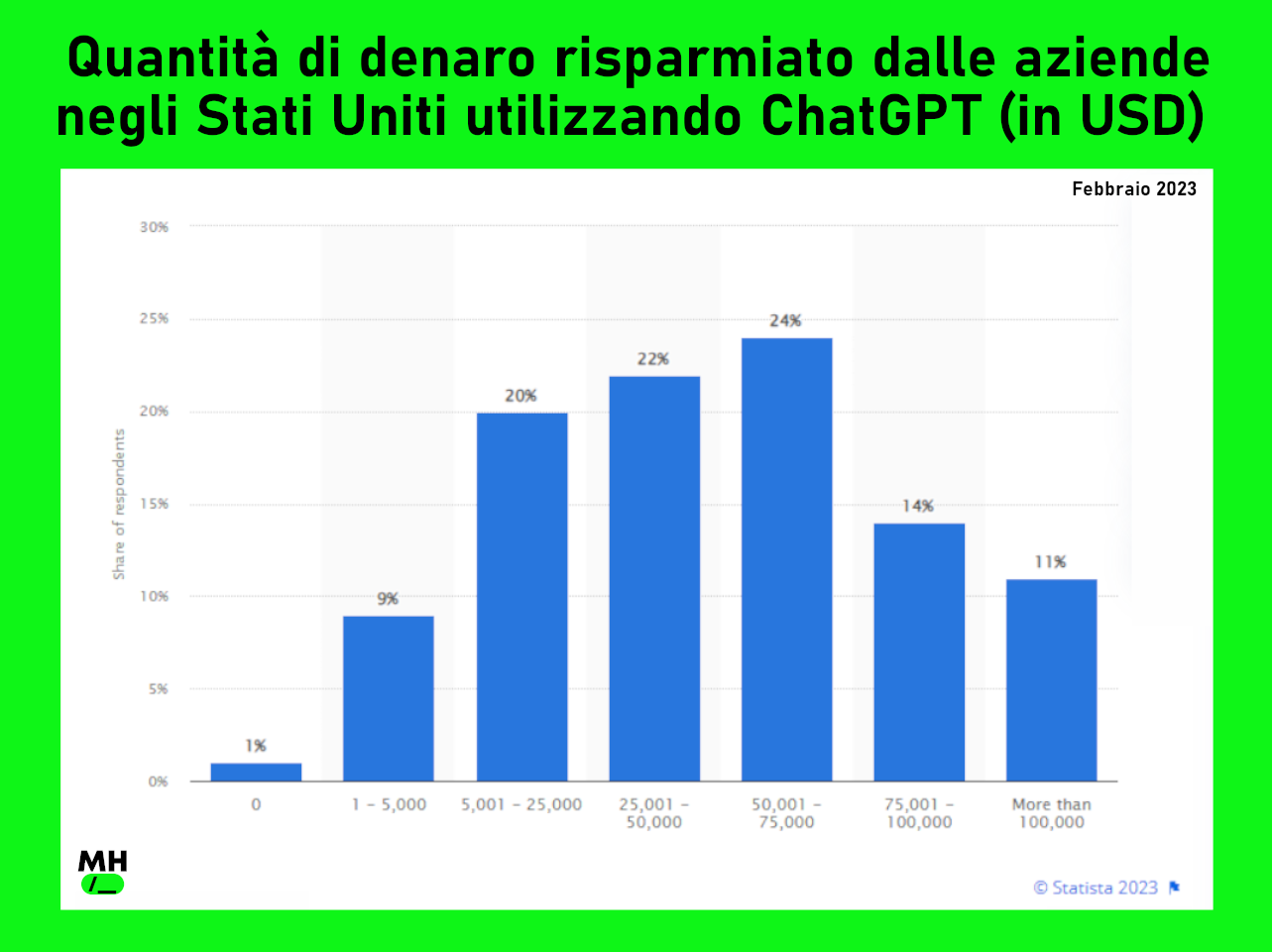
Bringing in artificial intelligence, and ChatGPT in particular, has delivered real savings and efficiency gains for many companies. According to a February 2023 survey, about a quarter of US business leaders said they had saved between $50,000 and $70,000 by using ChatGPT. Even more striking, 11% of respondents said they had saved over $100,000 by building ChatGPT into their day-to-day operations.
But saving money isn't the only upside. A Harvard study run with Boston Consulting Group found that AI can substantially boost job performance, improving results by more than 40%. According to the study, consultants who worked GPT-4 into their tasks were, on average, 25% faster than colleagues who didn't use it, and completed 12% more tasks.
Still, every technology has its limits. The Harvard study identified a technological "frontier": a point beyond which AI can start to stumble. For tasks inside that frontier, AI clearly amplified people's abilities. Past that line, some professionals who leaned too heavily on AI turned out to make more mistakes.
So the challenge is to understand what AI can really do and get the most out of it, while always staying inside its "frontier" of effectiveness.
How to use ChatGPT
The first step is to go to chat.openai.com. From there, you can set up a free account. OpenAI gives you a few ways to sign up: you can use your email address, or log in directly with your Google or Microsoft account.
Once you've signed up, the free version is GPT 3.5. If you want to try the model's advanced capabilities, a paid plan gives you access to GPT 4, which offers more precision and more features.
Once you're in, the interface is clean and simple: a chat screen. To start talking with ChatGPT, just type in the message box.
Getting the most out of ChatGPT
Making the most of ChatGPT takes an all-round approach, from understanding the mechanics underneath, like "prompt engineering", to good everyday habits. "Prompt engineering" means shaping your input carefully to get the best possible answers. Sharpening how you talk to the model is key to getting clear, precise responses.
Here are a few tactics to keep in mind:
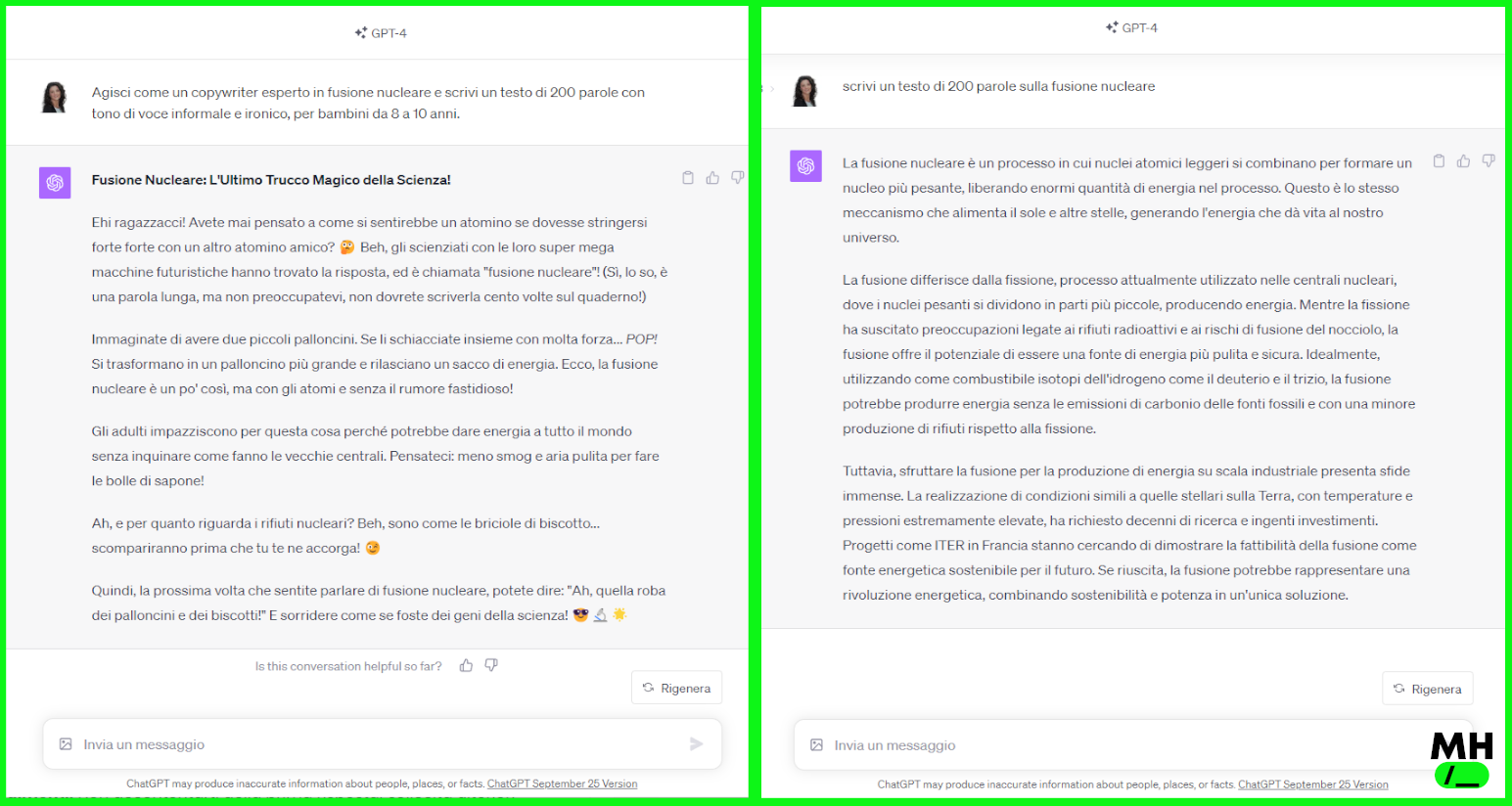
1. Role Playing: Giving ChatGPT a specific role can make or break the result. For example, if you ask "write a 300-word text on nuclear fusion", you'll get a generic answer. But if you say "act as a copywriter who specializes in nuclear fusion and write a 300-word text", you steer the model toward a more focused context, and the answer gets much closer to what you expect.
2. Be precise about what you want: Spell out exactly what you need from ChatGPT. If you're asking for a piece of writing, give the tone, the audience, the format and the length. For example: "Act as a copywriter who specializes in nuclear fusion and write a 300-word text in a formal, authoritative tone of voice, for college students." It also helps to include examples in your first prompt to point it in the right direction.
3. One question at a time: The fractal approach, where you break a complex task into smaller, manageable subtasks, works well with ChatGPT. Ask one question or make one request at a time, so the model can "think" and put together a fitting answer.
4. Ask for details or follow-ups: Don't settle for the first answer. Ask for more detail, or have the AI expand on specific parts of its reply.
5. Give it reference text: Giving ChatGPT the right context can make its answers far more relevant. If you have specific references or sources, share them. ChatGPT can also process files like PDFs or CSVs to give you even more precise answers.
It's also vital to understand and recognize ChatGPT's "hallucinations". These moments, when the model produces inaccurate or misleading answers, aren't common, but they do happen, especially with vague requests or topics outside its training. Hallucinations are basically errors of interpretation or output, where the model gives you information that doesn't match reality or the context you wanted. Knowing they can happen is the first step to fighting them. When in doubt, you can ask ChatGPT to cite its sources, or check the information yourself.
Remember: ChatGPT is a powerful resource, but it's the user's critical, informed approach that makes the interaction succeed.
ChatGPT pros and cons

ChatGPT has changed the way we interact with technology, bringing plenty of advantages along with a few challenges. Here are the pros and cons of this new kind of AI:
Pros:
- Saves time: ChatGPT answers in real time, so you don't need long research sessions or to wait for a human reply.
- Precise results: Thanks to the huge amount of data and information it was trained on, it can give detailed, accurate answers in many fields.
- Always available: It runs 24/7, so you get access and help at any moment, whatever the time zone or working hours.
- Tailored efficiency: Based on the user's questions and prompts, ChatGPT can tailor its answers, making the interaction more relevant and direct.
Cons:
- Room for error: As the "hallucinations" show, ChatGPT can sometimes give inaccurate or misleading information.
- No empathy: For all its advanced processing power, it can't understand or respond with real emotional context.
- Technical limits: ChatGPT has made huge strides, but the model still has built-in technical limits. Even so, every new release shows substantial progress.
- Hit-or-miss creativity: It can generate original content, but sometimes it lacks that unique, genuine spark of human creativity.
How ChatGPT has evolved and spread points clearly toward more and more artificial intelligence in our everyday work. There are undeniable benefits to using it, but you need a critical awareness of what it can and can't do. Right now, tools like ChatGPT stand for more than the future of communication: they hold the promise of a world where AI and people work together to build solutions nobody has tried before.
If you enjoyed this mini-course, help us grow: share it with your colleagues and friends and invite them to sign up to keep up. Keep following us to stay current on artificial intelligence and discover new opportunities.
Cosa ottieni iscrivendoti:
- Accesso a tutti gli episodi della newsletter
- Guide e corsi completi sull'AI per marketer
- Strumenti AI professionali (BrandPix, Short Video Suite)
- Crediti gratuiti per iniziare subito